Want to make your Google Shopping ads stand out from the rest? Believe it or not, simple additions to your Shopping ads like Product Ratings can and Free Shipping can drive more clicks on your products—and more conversions! In this infographic we’ll explore 5 easy upgrades you can make to your Google Shopping ads today.\n\n

\n
\n
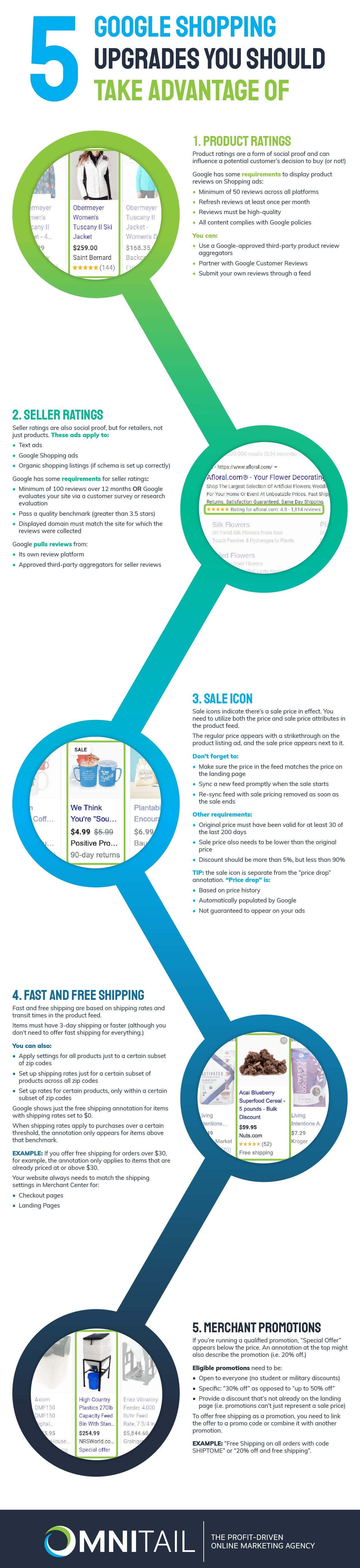
\n\nIn this infographic we looked at five different Google Shopping upgrades you should take advantage of. Here’s a quick recap.\n
\n - Product Ratings: Shows a star rating on your product listing.
\n - Seller Ratings: Shows a star rating of for your business on text ads, shopping ads, and organic listings.
\n - Sale Icon: Displays sale information on your product listing.
\n - Fast and Free Shipping: Displays “Free Shipping” or “Fast Shipping” on your product listing.
\n - Merchant Promotions: Displays “Special Offer” on your product listing.
\n
\nWhich Google Shopping upgrade are you going to try?\n\nIf you’re thinking of adding promotions or sales, start by using our
go-to Google Shopping promotions checklist. This will help you get started. After your promotions are up and running, if you encounter any errors check out our
troubleshooting guide for Google Shopping promotions.\n\nIf you’re thinking of adding the seller rating extension, but you’re not sure how much value it will add to your business—
check out our blog. In this blog, we actually calculate the added value the seller rating extension brings to your Google Shopping campaigns.\n\nIf there’s anything else you have questions about, reach out to
speak with an Omnitail analyst today. 
![5 Google Shopping Upgrades You Should Take Advantage Of [Infographic]](/wp-content/uploads/2021/04/5-GS-upgrades-info-titlecards.png)



 Our Guarantee